
Complete the New York Year-End Report Activity Table
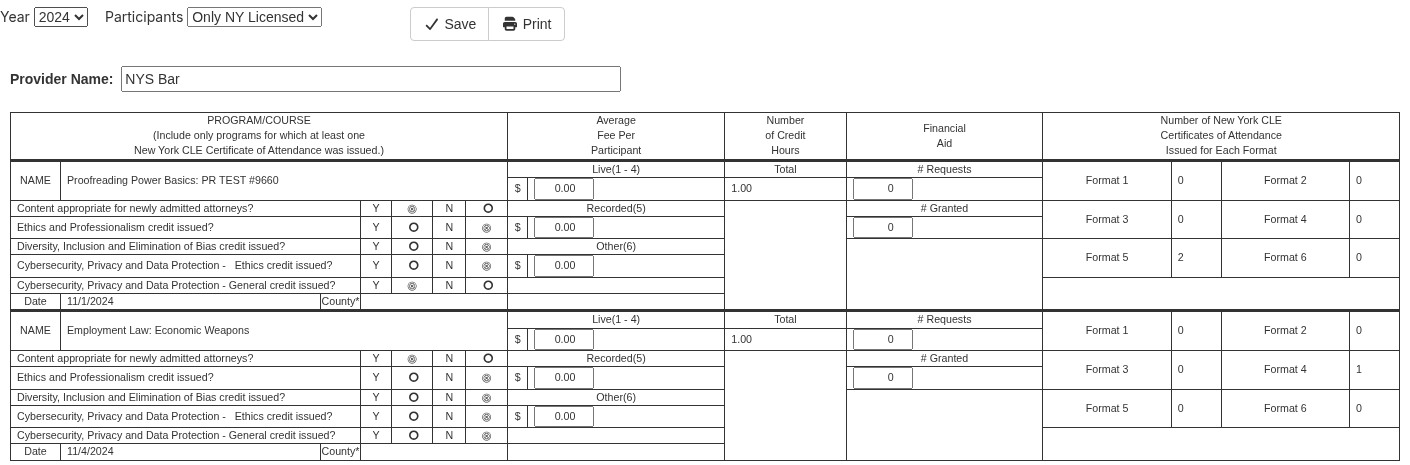
Use the New York Activity table to check and complete your CLE Activity Table. Accredited providers send it to the New York State CLE Board with their year-end report. It lists the programs your firm gave New York credit for in the year, with fees, credit hours, financial aid and certificate counts by format.
Administrators and people with the Reporter role open it from CLESite.
If your screens look different from these, your site is still on the previous design. The tasks are the same, but some labels and their places differ.
Before You Begin
- Your site must track New York CLE. The New York row appears under Regulator filings only on sites that do.
- Fill in the Activity table before the Summary. The Summary's financial aid boxes come from this table. See Complete the New York Year-End Report Summary.
- Check that each On-Demand Course has a Date Recorded, and that each New York office location has State/Province NY and a County. See What Each Row Shows below.
- Choose one Participants setting and use it every time you open this table or the summary.
Open the Activity Table
- In CLESite, select Reports.
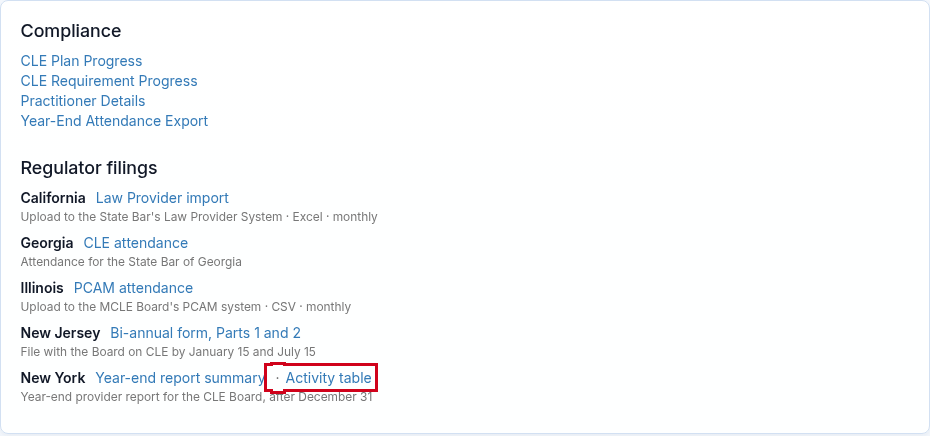
- Under Regulator filings, find New York.
-
Select Activity table.
The New York CLE — Year-End Report Activity Detail page opens.
- Choose the Year.
- Under Participants, keep Only NY Licensed to count only people with New York Practitioner Details. Choose All to count everyone.
You can also type "Activity table" in Search in the top bar.
Complete and Save the Table
Most of the table comes from your Courses and Events, so fix it there. You can only edit the provider name, the fees and the financial aid numbers on this page.
-
Check the Provider Name.
It starts from your New York certificate settings. A name you save here prints on the summary.
- For each program, enter the average fee in Live(1 - 4), Recorded(5) or Other(6) under Average Fee Per Participant.
- Under Financial Aid, enter the number of requests in # Requests and the number approved in # Granted.
-
Select Save.
The page reloads at the current year and Only NY Licensed. Choose your year and Participants setting again to check your entries.
- Select Print to print the table or save it as a PDF from your browser.
Enter fees and financial aid last, right before you print. Saved entries for a program are cleared if the page is opened with a Participants setting that leaves the program out. They're also cleared if the program's title, date, county or credits change.
What Each Row Shows
| Field | Where it comes from |
|---|---|
| NAME | The Course title. An Event shows "Course title: Event title" when the two differ. |
| Content appropriate for newly admitted attorneys? | Y unless the New York credit is set for experienced attorneys only. |
| Ethics and Professionalism, Diversity, Inclusion and Elimination of Bias, and the two Cybersecurity, Privacy and Data Protection questions | Y when that New York credit type has credits, not only self-study credits. On-Demand programs use the Course's credits, and Events use the Event's credits. |
| Date | For an Event, its date. For an On-Demand Course, the Date Recorded in the Course editor's On-Demand Content section. Without it, the date the content was uploaded or the first completion date is used. |
| County | The County of the Event room's office location. It shows only when the location's State/Province is NY and the Event's classroom format is Live Seminar. Set both in InstructorSite under the gear icon › Global Settings › Office Locations and Rooms. You can't change County on this page, even though the page's note says so. |
| Number of Credit Hours | The total New York credits on the Course or Event, including self-study credits. |
| Number of New York CLE Certificates of Attendance Issued for Each Format | How many people earned New York credit in each format. See the next section. |
The Board's date can be from an earlier year. A recorded program can be used for several years, and the Board needs the date it was recorded.
How Formats Are Counted
Each attendee is counted under the format of the Learning Format they took the program in. Online attendees of an Event use the Event's online format. On-Demand completions use the Course's On-Demand format.
| Format | Learning Format in UniversitySite |
|---|---|
| 1 | Live Seminar (traditional live classroom) |
| 2 | Live Webinar with Group Participation (questions allowed) |
| 3 | Live Webinar (questions not allowed) |
| 4 | Live Video Conference (fully interactive videoconference) |
| 5 | Pre-Recorded Audio/Video (with or without group participation), On-Demand Course, and Equivalent Course Completion |
| 6 | Any other Learning Format, such as Live Audio Conference. Describe it in the summary's Description of "Other" format box. |
Only attendees whose attendance is recorded are counted. Instructors aren't counted.
Frequently Asked Questions
Why is a program missing from the table?
Check that it has New York credit, not by reciprocity, and that at least one person's attendance or completion is recorded in the year. If Participants is Only NY Licensed, at least one attendee needs New York Practitioner Details.
The Course's content provider must be set as In-House. Every Event, including online-only ones, also needs a room at one of your office locations.
Why are my fees or financial aid numbers gone?
First choose your year and Participants setting again, because Save reloads the page at the current year. If they're still gone, enter them again. Entries are cleared when the page is opened with a Participants setting that leaves the program out, or when the program's title, date, county or credits change.
Why does my On-Demand Course show the wrong date, or a date from an earlier year?
Set Date Recorded in the Course editor's On-Demand Content section. The table uses that date, which can be from an earlier year.
Why is County blank?
Set the office location's State/Province to NY and fill in its County under Office Locations and Rooms. County shows only for Events whose classroom format is Live Seminar. On-Demand programs and programs outside New York State leave it blank, as the Board expects.
Why is a program counted in the wrong format?
Change the Learning Format on the Event or Course, then open the table again. The table under How Formats Are Counted shows which format each Learning Format maps to.
Where do I find the Year-End Report Summary?
It's next to Activity table in the same New York row. See Complete the New York Year-End Report Summary.