
How Do Course Edits Affect Future Events?
When you save changes to a Training Course in InstructorSite, UniversitySite updates future scheduled events differently depending on the type of change.
Changes fall into two clear categories:
✅ Changes That Propagate (or can propagate) to Future Events
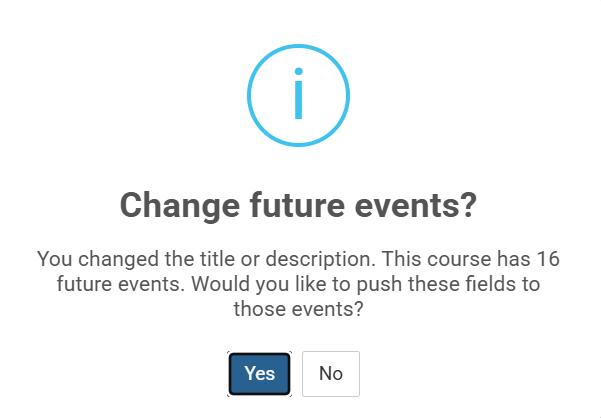
- Title or Description The system counts how many future events will be affected and prompts you to choose whether to push the new text to all future sessions.
-
You can accept (updates all future events) or decline (future events keep their original Title/Description).
-
- Disabled / Enabled status This is automatic — no prompt is shown. Future events immediately match the course’s new visibility (published or hidden).
❌ Changes That Do NOT Propagate to Future Events
These stay exactly as they were when the event was originally created:
- CLE/CPD Credits
- Tags
- Audiences
- Departments
Important notes
- Past events are never affected by any course-level edits.
- Existing future events with registrants are protected from automatic credit/tag changes to preserve compliance accuracy and respect any manual overrides already applied.
Tips
- Use the prompt for Title/Description changes when you want consistency across the entire series.
- If a course is disabled, all its future sessions are immediately hidden from learners in the self-service catalog.
- To update credits, tags, audiences, or departments on future events, you must edit them individually (see below).
How to Update an Event’s Credits (Manual Override)
If an event’s credits no longer match the course (e.g., after a course credit change or manual edit), you can restore them:
- Open the specific event in InstructorSite.
- On the event edit screen, click Restore Training Course Credits.
- Confirm — this replaces any custom event-level credits with the current course definition.
This is a per-event action and must be done individually for each session you want to sync.
Frequently Asked Questions
What is the difference between prompted and automatic updates?
Title and Description require your explicit confirmation. Disabled/Enabled status is synchronized automatically because session visibility must always match the course’s published state.
If I say "Yes" when prompted after a Title or Description Edit, does UniversitySite send new updated meeting requests to people already registered?
No, but new registrants will receive these updated properties in their meeting requests.
If I added a Tag, Audience, or Department to the course but want it to appear on my already scheduled future events is there an easy way to do that?
Yes, using Tags as our example but the others are virtually the same
- Go to the Tags page
- Click on the Tag you want applied to your already scheduled future events
-
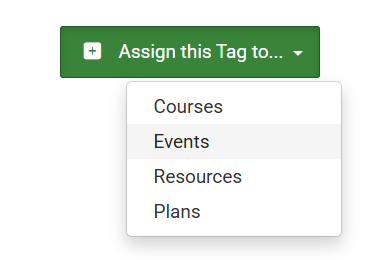
From the drop down menu on the green + Assign this Tag to: button, choose Events
- Search the page for the event title
- Choose Select All
- Choose the blue +Add Tag to selected Events button
Will changing course credits update events that already have registrants?
No. Events retain their original credits to protect attendance records and compliance. Use the Restore Training Course Credits action on individual events if you need to sync them.
Can I restore an event’s credits to the current course defaults?
Yes — use the Restore Training Course Credits button on the event edit screen.