
Prorating New York CLE Requirements
A newly admitted New York attorney who doesn't practice law in New York for part of their newly admitted period needs only 1.5 CLE credits for each month they do practice. In UniversitySite, you record the months they were exempt in their Practitioner Details, and their compliance report shows the prorated requirement.
If your screens look different from these, your site is still on the previous design. The tasks are the same, but some labels and their places differ.
How It Works
Newly admitted attorneys who are exempt from the CLE requirement at the beginning of their biennial reporting cycle must complete 1.5 CLE credits for each month of the reporting cycle during any part of which the attorney practices law in New York. These proration credits may be in any category.
Similarly, if a newly admitted attorney becomes exempt from CLE requirements in New York during the biennial reporting cycle and remains exempt through the cycle, that attorney must complete 1.5 CLE credits, in any category, for each month of the reporting cycle the attorney practices law in New York. These credits must be completed by the second anniversary of admission to the New York Bar.
When you enter the exempt months, UniversitySite changes the attorney's newly admitted requirements:
- The newly admitted period becomes one 24-month period from the date of admission.
- The requirement is 1.5 credits for each month the attorney isn't exempt, up to the usual 32 credits.
- The separate category requirements, such as Ethics and Professionalism, are removed. Credit in any category counts toward the total, except pro bono.
An Example
A newly admitted attorney practices in New York for the first two months of their reporting cycle and then stops. They are exempt for the other 22 months, so their prorated requirement is 3 CLE credits (2 months × 1.5). The attorney may then certify on the biennial attorney registration form that they have completed 3 CLE credits and are in full compliance.
When to Use It
Enter exempt months only when the attorney is entitled to the prorated amount: they were exempt at the start of the period, or they became exempt during it and stayed exempt to the end. If the attorney practiced in New York for the whole period, leave the exemption off.
If the attorney isn't subject to newly admitted requirements at all, turn on Not Subject to Newly Admitted Requirements instead. That setting overrides any exempt months.
Record the Exempt Months
You need administrator access or the Accreditation Manager role.
- In CLESite, select Users.
- Select the attorney.
- Select Edit Practitioner Details.
-
In the New York box, check that Date Admitted, Birth Month and Birth Day are filled in.
The exemption has no effect until all three are set.
- Turn on Enable Exemption for the Newly Admitted Period.
-
In Number of Months Exempted, enter a number from 1 to 24.
The box shows "Requirement will be 1.5 credits per active month."
- Select Save.
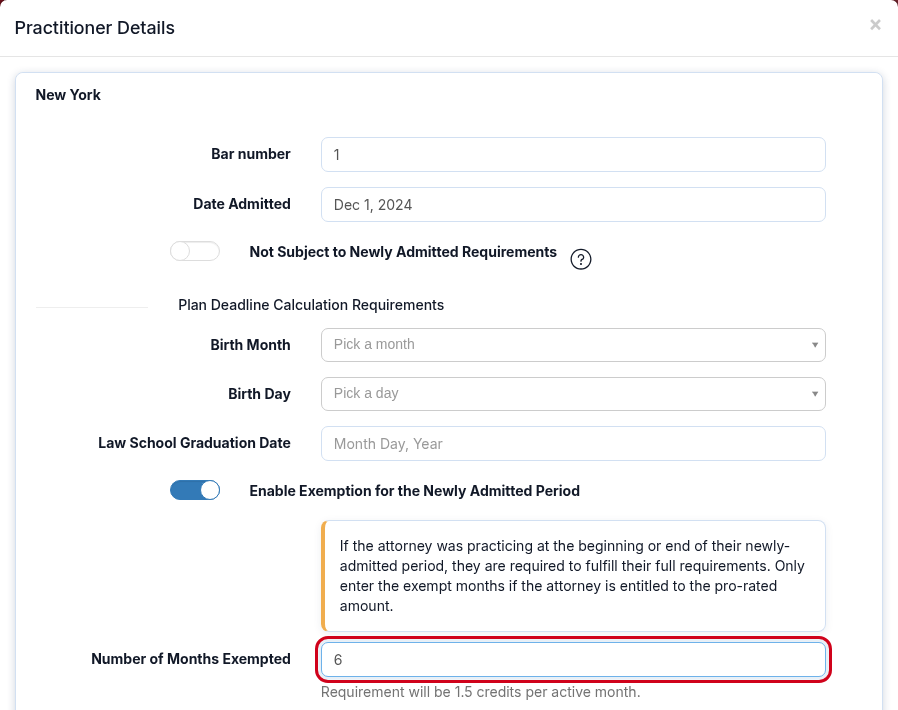
You can also open the same window from a New York Plan. On the Plan's Users tab, select Practitioner Details under the attorney's name. For more ways in, see Update Bar Number on User Profile.
Frequently Asked Questions
Why didn't the attorney's requirement change after I entered the exempt months?
Check that Birth Month and Birth Day are filled in, as well as Date Admitted. Also check that Not Subject to Newly Admitted Requirements is off, because it overrides the exemption.
Why can't I save?
Number of Months Exempted needs a number of whole months from 1 to 24. Save stays unavailable until the number is in that range.
What happens if I enter 24 months?
The attorney has no newly admitted CLE requirement, because they practiced in New York for none of the period.
Can I prorate a newly admitted attorney in another jurisdiction?
Not with this setting. It appears only for New York. To change another attorney's requirements, see What Does It Mean to Override Requirements and When Should I Do It?